How To Turn Your TV Into A Revenue Stream With Beam
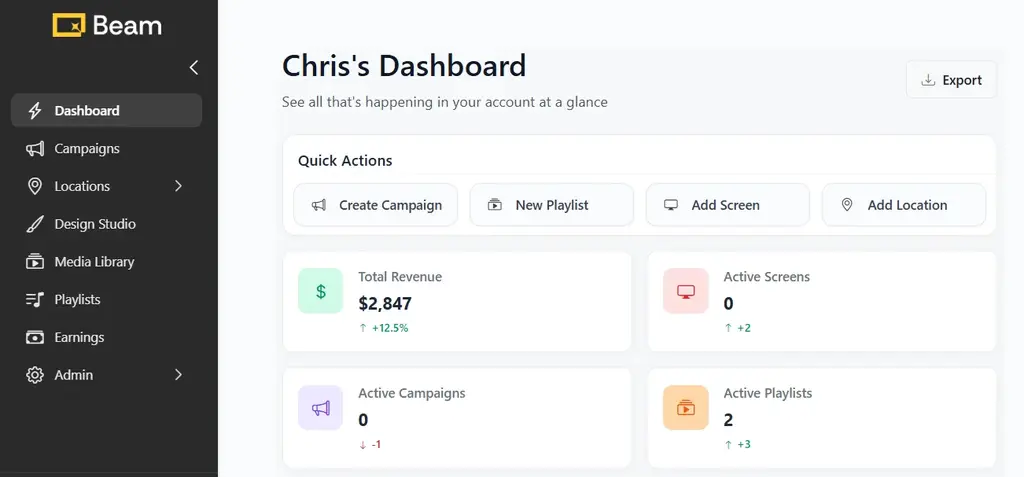
You can turn your TV into a revenue stream by connecting it to the Beam dashboard, uploading content, and enabling ad placements. Beam allows you to monetize screen time by displaying targeted ads between your content, generating income based on plays, location, and campaign activity.
What Does It Mean to Monetize Your TV?
Monetizing your TV means using your screen to display advertising content that generates revenue. Instead of showing only your business content, your TV becomes part of a network that delivers ads to a targeted audience.
With Beam, this process is managed through a centralized dashboard where you control what plays, when it plays, and how revenue is generated.
Here’s how it works
Beam provides a centralized dashboard that manages your screens, content, and ad activity in one place. You need to:
Connect your TV to the Beam platform
Upload or assign content to your screen
Enable ad injection time within your playlist
Earn revenue based on ad delivery and plays
To start running ads and generating revenue, you’ll need to set up campaigns correctly.
👉 Learn how to do it here: How to Earn Money from Your Screens with Beam
What You Need to Get Started
Setting up your TV for revenue generation requires a few essentials:
A digital screen (TV or display)
A media player or compatible smart TV
Internet connection (recommended for real-time updates)
Access to the Beam dashboard
Once connected, your screen becomes part of a managed network ready for content and ads.
How Revenue Is Generated
Revenue is earned when ads are displayed on your screen as part of active campaigns.
Your earnings depend on:
Screen location and visibility
Audience traffic in that location
Frequency of ad display
Beam handles:
Campaign delivery
Payment processing
Platform operations
Using the Beam Dashboard Effectively
The Beam dashboard is where all operations happen. It allows you to:
Create and manage playlists
Schedule when content plays
Monitor recent campaigns and performance
Control ad injection intervals
Track screen activity
Keeping your content updated and your screen active ensures consistent ad delivery and better revenue potential.
Best Practices to Maximize Earnings
Place screens in high-traffic locations
Keep content active and regularly updated
Use balanced playlists with space for ads
Ensure screens are online and functioning consistently
Monitor performance and adjust scheduling when needed
Common Mistakes to Avoid
Leaving screens inactive or offline
Overloading playlists without ad slots
Using low-visibility screen placements
Poor screen placement
Summary
Turning your TV into a revenue stream is a structured process using the Beam dashboard. By connecting your screen, scheduling content, and enabling ad placements, you can generate consistent income from screen time while maintaining full control over your display.
To get started, sign up on Beam and turn your screen into a revenue stream: usebeam.io
How do I start earning from my TV with Beam?
Connect your screen to the Beam dashboard, set up your content, and enable ad placements to start receiving campaigns.
How often will ads play on my screen?
Ad frequency depends on your playlist settings and ad injection intervals configured in the Beam dashboard.
How much can I earn from my TV?
Earnings vary based on location, traffic, and campaign demand. High-visibility areas generate more plays and higher returns.
How often are ads displayed?
Ads are shown based on your selected injection interval, such as every 3,6,9,12 or 15 minutes